
Best Way to Store Recipes: 2026 Guide
Table of Contents
- Why the Best Way to Store Recipes Matters
- Paper-Based Recipe Storage: Recipe Binder Organization
- Digital Recipe Storage: How to Organize Recipes Online
- Save Recipes from Websites: Capture and Preserve
- The Best Recipe Organizer App for Your Needs
- Hybrid Approach: Combining Paper and Digital Methods
- Backup, Sharing, and Long-Term Access
- Frequently Asked Questions
Last Updated: October 14, 2026
Why the Best Way to Store Recipes Matters
The best way to store recipes seems simple until you're drowning in saved Pinterest pins, torn magazine pages, and browser bookmarks. Most home cooks have recipes scattered across a kitchen drawer, a phone folder, a note-taking app, browser tabs, and handwritten cards, so they waste time hunting instead of cooking.
The real challenge is access. You need to find recipes quickly at the grocery store, while meal planning, or in front of an open fridge at 6 PM. You need to know which fit your dietary restrictions, avoid repeating meals, and share recipes without links that expire or get buried in text threads.
This guide covers the best way to store recipes across paper, digital, and hybrid approaches, and how to migrate a scattered collection into one organized system.
Paper-Based Recipe Storage: Recipe Binder Organization
A recipe binder remains one of the most reliable methods for cooks who prefer physical copies. The appeal is simplicity: flip through pages, mark favorites with sticky notes, and scribble modifications directly onto cards. No batteries, no login.
The standard setup is a three-ring binder with clear sheet protectors and color-coded dividers.
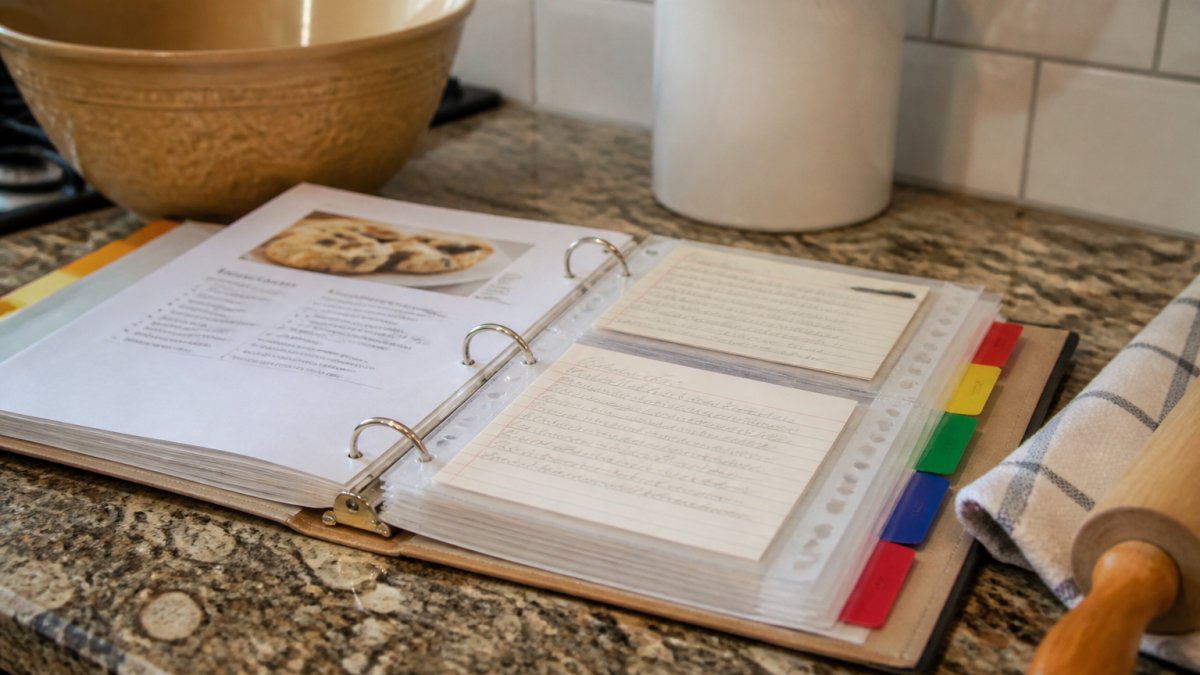
The tradeoff is maintenance. Pages stain, binders get heavy past 200 recipes, and printing costs paper and ink. Sharing means photographing or handwriting a recipe, and digitizing later means scanning or re-entering everything manually.
Paper-based storage works best for cooks who:
- Cook from the same 30-50 recipes regularly
- Prefer handwritten notes and modifications
- Want zero technology friction in the kitchen
- Have limited digital literacy or spotty internet at home
Digital Recipe Storage: How to Organize Recipes Online
Digital recipe storage solves the scattering problem: instead of recipes living in bookmarks, email attachments, and note apps, they live in one searchable collection accessible from your phone at the store, tablet while cooking, or computer while meal planning.
The approach is straightforward: capture recipes from websites, apps, or your own notes into one platform, then tag, sort by meal type or cuisine, filter by dietary restrictions, and add personal notes.
Popular options include Recipe Keeper, RecipeSage, and Copy Me That.
The advantage is speed and searchability: search "30-minute chicken" to find every match, filter gluten-free recipes with one tap, share a link a family member can save, and access recipes offline if you download them beforehand.
The drawback is setup time: you either enter recipes manually or use browser extensions, and some platforms require manual tagging. If the service shuts down or you switch platforms, migrating can be tedious.
Digital storage works best for cooks who:
- Save recipes frequently from social media, blogs, and YouTube
- Need to filter recipes by dietary requirements or ingredients
- Shop from their phone and want recipes accessible at the store
- Collaborate with household members on meal planning
Save Recipes from Websites: Capture and Preserve
The friction point for most digital systems is capture. You find a recipe on Instagram, TikTok, a food blog, or YouTube, and manually typing it into an app defeats the purpose.
The solution is a capture tool that extracts recipe titles, ingredients, instructions, and images automatically from web pages, cleaning up ads and extraneous text that clogs typical recipe sites.
The process is simple: find a recipe online, click a button, and it appears in your collection cleaned up and organized, no copying, pasting, or manual entry.
This works for food blogs, recipe websites, and some social platforms. YouTube and Instagram Reels require more manual effort because the recipe is embedded in video rather than structured text.
The key benefit is time saved: capturing takes seconds instead of minutes, so you're more likely to save recipes you'll actually cook, and your collection grows without typing or handwriting.
The Best Recipe Organizer App for Your Needs
Choosing the best recipe organizer app is less about features and more about which one matches how you find, cook, and share recipes. Score each option against five criteria that affect daily use: cost, setup time, searchability, portability, and spill resistance.
Here is how the main options stack up against those criteria.
Founders limited offer is open now →
| App | Cost | Setup Time | Searchability | Portability | Spill Resistance |
|---|---|---|---|---|---|
| Linkplate | Paid | Low, auto-captures from YouTube, Instagram, and food blogs | Tag and filter by ingredient, meal, or source | Phone, tablet, web | Digital only; device-dependent |
| Recipe Keeper | Free tier + paid upgrade | Medium, manual entry or browser capture | Tag, filter, and sort by category | iOS, iPad, Android, Windows, Mac | Digital only; device-dependent |
| RecipeSage | Free, open source | Medium, manual entry or import | Tag, filter, meal-plan integration | Web and mobile browser | Digital only; device-dependent |
| Paper binder | Low (binder, sleeves, ink) | High, print, hole-punch, file | Manual flip-through; no keyword search | Physical, no power needed | High, sleeves wipe clean |
| Hybrid (app + binder) | Medium | High initially, low ongoing | Digital search + physical flip-through | Both | High for printed staples |
How to read this table. If you save recipes constantly from social media and want the lowest capture friction, Linkplate's auto-capture and grocery-list conversion reduce the most steps. If you cook from the same recipes repeatedly and want zero screen time in the kitchen, a paper binder wins on spill resistance and reliability.
A decision shortcut. Ask three questions:
- Where do most of your recipes come from right now? If the answer is Instagram, TikTok, or YouTube, prioritize an app with auto-capture. If the answer is cookbooks and magazines, prioritize a binder and a scanner.
- Do you cook from a phone or from paper? If you prop your phone on the counter, a digital app with offline download matters. If you prop a binder, sleeves matter more than sync.
- Do you share cooking with anyone else? If yes, choose a platform that supports shared collections or exportable files so a partner or family member can access the same recipes.
What none of these apps solve for you. No app will decide your categories, prune recipes you never cook, or keep your phone clean while you handle raw chicken. Those are habits, not features. The app is the container; the system is what you build around it.
Hybrid Approach: Combining Paper and Digital Methods
A hybrid system works because paper and digital solve different problems. Digital handles volume, search, and sharing; paper handles kitchen usability, spill resistance, and zero-friction access with flour-covered hands. Rather than picking one side, assign each recipe to the format matching how often you cook it.
The 80/20 rule for hybrid storage. Most home cooks rotate through 20 to 50 favorites while accumulating hundreds they rarely cook. A practical split:
- Paper binder: your 20-50 proven, repeat-cook recipes. These are the ones you reach for weekly. Print them, sleeve them, and annotate them by hand.
- Digital app: everything else, the long tail of saved recipes, new discoveries, and recipes you are still testing. Keep them searchable and easy to prune.
- Promotion rule: when a digital recipe gets cooked three times and works, print it and move it into the binder. When a binder recipe has not been cooked in a year, consider demoting it back to digital or removing it.
This rule keeps the binder small, current, and useful instead of becoming a 200-page brick you never open.
A practical migration plan. If your recipes live in a kitchen drawer, phone folder, bookmarks, screenshots, email, and cookbooks, consolidate in this order:
- Capture first, sort later. Spend one or two sessions dumping everything into a single digital inbox, a folder in your chosen app, a note, or a cloud folder. Do not categorize yet. The goal is to stop the scattering.
- Deduplicate. Search your inbox for duplicate titles or near-duplicates (for example, three versions of the same banana bread). Keep the version you actually cook and delete the rest.
- Tag by retrieval, not by cuisine. Tag recipes by the way you actually search for them: meal type (breakfast, dinner), main ingredient (chicken, beans), dietary need (gluten-free, dairy-free), and time (under 30 minutes, weekend project). Cuisine tags are useful but rarely the first thing you search.
- Test the search. Pick five random recipes and try to find each one in under 10 seconds using only tags and keywords. If you cannot, your tagging scheme is too vague.
- Print the proven ones. Move your repeat-cook recipes into the binder with sleeves and dividers. Write your modifications directly on the page.
- Set a quarterly review. Once every three months, export your digital collection as a backup, delete recipes you have not cooked, and promote any new favorites to paper.
Household sharing in a hybrid setup. If more than one person cooks, agree on one shared digital collection as the source of truth and keep the paper binder as the kitchen-facing copy. A partner can add a recipe from their phone, and whoever cooks can print it once it earns a binder spot, giving each cook the format they'll actually use without duplicating effort.
Protecting the paper side. Sleeves protect against splashes, but heat, steam, and grease still degrade paper. Keep the binder away from the stove, wipe sleeves after messy sessions, and store it upright. For constant-use recipes, laminate a single card instead of sleeving a full page, it survives more handling and takes less counter space.
Backup, Sharing, and Long-Term Access
The biggest risk of digital recipe storage is loss: if a service shuts down or you lose account access, your collection disappears. That's why backup matters.
Sharing is another consideration: paper recipes require physical transfer or photography, while digital recipes can be shared via link, email, or app.
For long-term access, consider whether your platform will exist in five years. Established apps with paying customers and subscription services have revenue models that support longevity.
The safest approach is regular backup plus a platform you trust: export your collection every quarter and store it somewhere secure as a fallback.
Organizing recipes seems like a small problem, but it compounds: a scattered collection wastes minutes every time you cook.
If you save recipes frequently from social media and food blogs, Linkplate transforms the process.
Start with whichever method matches your current workflow, then adjust as your needs change.
Frequently Asked Questions
What is the best way to save recipes from websites?
The best way to save recipes from websites depends on your preference. Digital recipe apps let you capture recipes directly from food blogs, YouTube, and Instagram with a single click, storing them in one searchable collection. Browser extensions and built-in save features work for quick bookmarking. For offline access and portability, digital apps that sync across devices offer more flexibility than browser bookmarks alone. Many apps also clean up formatting and extract ingredients automatically.
Is it better to store recipes digitally or on paper?
Digital storage offers searchability, automatic backup, and easy access from any device, ideal for busy parents and professionals juggling meal planning. Paper binders provide offline access, tactile satisfaction, and no subscription costs. The best choice depends on your lifestyle. Digital works best if you save recipes from social media and need quick grocery lists. Paper suits those who prefer handwritten notes or have limited internet access. Many people use both methods: digital for discovery and planning, paper for kitchen reference.
How do you organize recipes so they are easy to find?
Organization requires categorization and consistent tagging. For paper, use dividers labeled by meal type (breakfast, mains, desserts) or dietary requirements. For digital storage, tag recipes with multiple labels (quick weeknight, vegetarian, budget-friendly) and use search functions. Color-coded systems work well in both formats. Regularly remove recipes you no longer use to prevent clutter. The key is choosing a system simple enough to maintain, whether that's alphabetical, by cuisine, or by meal-prep time.
Can you save recipes from Instagram and YouTube?
Yes, specialized recipe apps can capture recipes from Instagram Reels, YouTube videos, and food blogs. These apps extract ingredients and instructions from video content and convert them into organized, readable formats. Browser extensions and built-in save features work for static web pages but struggle with video content. Digital recipe organizers designed for social media sources handle the extraction automatically, making it practical to collect recipes from the platforms where you discover them most.
What should I read next?
- 7 Best Apps for Grocery Planning and Smart Shopping · 14 min read
- Best RecipeKeeper Alternatives 2026 · 11 min read
- Best Digital Recipe Organizers for Families · 12 min read
- How Do You Calculate Nutrition From Instagram Recipes? · 15 min read
Or browse every post.
Questions or ideas for a post? Get in touch →