
How to Organize Online Recipes: A 2026 Guide
Table of Contents
- Why Organizing Online Recipes Matters
- Step 1: Choose Your Recipe Storage Method
- Step 2: Save Recipes from Multiple Sources
- Step 3: Use Recipe Tags and Collections to Organize
- Step 4: Search and Filter Your Recipe Collection
- Step 5: Convert Saved Recipes Into a Grocery List
- Step 6: Keep Your Recipes Accessible Across Devices
- How to Handle Your Existing Recipe Backlog
- Frequently Asked Questions
Last Updated: October 12, 2026
Why Organizing Online Recipes Matters
When you need to organize online recipes, finding one you loved three months ago shouldn't feel like searching for a needle in a haystack.
The real problem isn't that you're saving too many recipes. It's that you're saving them everywhere. Each platform has its own system, its own search limitations, and its own way of burying recipes you actually want to use.
Learning how to organize online recipes changes how you cook. Instead of browsing for 15 minutes, you find what you need in seconds. Instead of buying duplicate ingredients because you didn't know you had three versions of the same recipe, you cook with intention.
This guide walks you through building that system step by step.
Step 1: Choose Your Recipe Storage Method
Your storage method is the foundation. Pick wrong, and you'll abandon the system within weeks. Pick right, and organizing becomes automatic.
You have three main paths forward: browser-based tools, spreadsheets, or dedicated recipe apps. Each has real trade-offs.
Browser bookmarks and note-taking apps
Browser bookmarks feel free and simple. You click save, and the recipe lives in a folder. No signup, no learning curve.
The catch appears fast. Bookmarks don't travel well across devices. Your phone doesn't see your desktop bookmarks easily. You can't add notes about dietary swaps you made. You can't search inside the recipe content itself, only by bookmark name.
Note-taking apps like Apple Notes or Google Keep work slightly better. You can copy the full recipe text, add your own notes, and access it everywhere. But they're designed for quick capture, not organization. Searching through hundreds of notes gets messy.
Best for: People with fewer than 20 saved recipes who cook the same dishes repeatedly.
Spreadsheets and manual databases
A spreadsheet gives you real control. You create columns: recipe name, cuisine, prep time, ingredients, link. You add rows as you find new recipes. You can sort by prep time or cuisine. You can add your own notes about what worked.
The effort compounds. Copying recipe text into cells takes time. Updating a recipe when you find a better version means finding the old entry and editing it. Searching for recipes with specific ingredients means scrolling through your entire list. After 100 recipes, the spreadsheet becomes a chore to maintain.
Spreadsheets work if you're disciplined and have a small collection. Most people aren't, and most collections grow faster than expected.
Best for: Detail-oriented cooks who want complete control and don't mind manual data entry.
Dedicated recipe organizer apps
Recipe apps are built for exactly this job. They capture recipes from websites with one click. They organize by category, tags, and dietary requirements. They search across ingredients, prep time, and cuisine.
The trade-off is that most apps require a subscription. But the time you save, and the reduction in wasted ingredients, usually pays for itself within months.
Linkplate captures recipes from sources like YouTube cooking videos, Instagram Reels, and TikTok. It cleans the data automatically, removing ads and duplicate ingredient lists.
Best for: Anyone with more than 30 recipes or recipes from multiple sources.
Step 2: Save Recipes from Multiple Sources
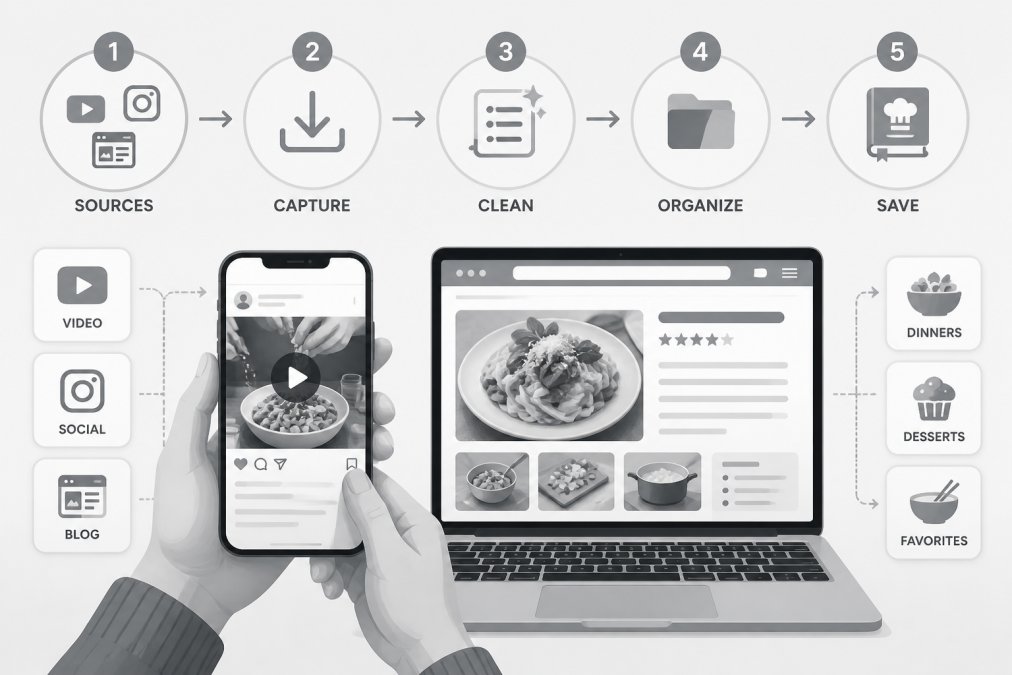
Your recipes live everywhere. Food blogs, YouTube channels, Instagram accounts, TikTok creators, family emails, printed magazine clippings. Each source requires a different capture method.
Saving from food blogs and recipe websites
Food blogs are the easiest source. Most recipe websites have a save button built in. Click it, and the recipe goes straight into your app.
If the website doesn't have a save button, copy the recipe URL and paste it into your recipe app's import feature. Most apps can pull the recipe content automatically from the link.
For recipes without a URL, printed pages, magazine clippings, handwritten family recipes, you have two options. Type the recipe into your app manually (slow but thorough).
The key is consistency. Pick one method and stick with it. If you save some recipes as links and others as typed text, you'll lose recipes in the chaos.
Capturing recipes from social media
Social media is where recipes move fastest. A creator posts a video on Instagram, and it's gone from their feed within 24 hours. TikTok videos disappear when accounts are deleted. YouTube recipes get lost in the algorithm.
Screenshot the recipe if you can. Take a photo of the video while it plays. Save the creator's name and the platform. This gives you a backup if the original disappears.
For apps like Linkplate that integrate with social platforms, the capture is automatic. You see a recipe on Instagram, click save, and it's archived with the ingredients already extracted.
Importing handwritten and printed recipes
Family recipes are irreplaceable. Printed recipes from cookbooks or magazines matter too. These need special handling.
Take a clear photo of the recipe card or page. Store it in your recipe app as an image. Add text notes with the recipe name, source, and any changes you've made.
If you want the recipe searchable, type it into your app. This takes time but creates a permanent, searchable record. Many families find this worth doing for recipes they cook regularly.
Step 3: Use Recipe Tags and Collections to Organize
Raw recipe data is useless without a system to find it. Tags and collections are your search tools.
Creating a sustainable tagging system
Tags let you mark recipes by multiple attributes at once. A recipe can be tagged "weeknight," "pasta," "under 30 minutes," and "vegetarian" simultaneously. When you search for "weeknight AND vegetarian," both recipes appear.
The mistake most people make is creating too many tags. One person uses "quick," another uses "fast," another uses "30-minute." You end up with overlapping tags that don't work together.
Build a simple tag system upfront:
Founders limited offer is open now →
- Cooking time: under-15-min, 15-30-min, 30-60-min, 60-plus-min
- Cuisine: italian, asian, mexican, american, middle-eastern
- Meal type: breakfast, lunch, dinner, dessert, snack
- Dietary needs: vegetarian, vegan, gluten-free, dairy-free, keto
- Effort level: no-cook, minimal-prep, hands-on
- Occasion: weeknight, weekend, entertaining, holiday
Stick to this list. Don't add new tags on a whim. When you're tempted to create "quick-italian-weeknight," use the existing tags instead: "italian" + "under-30-min" + "weeknight."
Organizing by dish type and dietary requirements
Collections are folders for recipes. Create a collection for each dish type: "Pasta," "Soups," "Salads," "Breakfast." Or organize by dietary requirement: "Keto Recipes," "Vegetarian Dinners."
Collections work best when they're broad. Too many small collections (like "Weeknight Pasta for Guests") and you'll forget which collection a recipe is in. Too few (like "Everything") and you're back to browsing.
Most people need 5-10 collections maximum. Combine collections with tags for precision. Your "Pasta" collection might contain 40 recipes. Tag them by dietary type and cooking time to find the exact one you want.
Managing duplicates and data quality
You'll discover the same recipe saved three different ways. The blog version, the YouTube version, the Pinterest version. They're identical but take up space.
Review your collection monthly. Look for recipes that are nearly identical. Keep the version with the clearest instructions. Delete the duplicates.
Fix messy data as you go. If a recipe name is unclear, rename it. If the ingredient list is formatted strangely, clean it up. If a link is broken, delete it. Small maintenance prevents big chaos later.
Linkplate handles much of this automatically. It detects duplicate recipes and suggests merging them. It cleans formatting and extracts ingredients consistently.
Step 4: Search and Filter Your Recipe Collection
A well-organized collection is useless if you can't find recipes in it. Search and filtering are your daily tools.
Your recipe app should let you search by recipe name, ingredient, cuisine, cooking time, and dietary requirement. The best apps combine multiple filters at once: "Show me vegetarian recipes with chicken that take under 30 minutes." (This example is contradictory, but you get the idea.)
Test your search before you commit to an app. Save 10 recipes and try searching for them. Can you find them easily? Does the app suggest recipes you forgot you had? Does it handle typos gracefully?
The faster your search, the more likely you'll actually use the system. If searching takes more than 5 seconds, you'll give up and search Google instead.
Step 5: Convert Saved Recipes Into a Grocery List
This is where recipe organization pays off. Once your recipes are organized, you can use them to shop faster.
Select the recipes you plan to cook this week. Your app should automatically extract the ingredients from all of them and create a combined grocery list. Duplicate ingredients merge automatically (no more buying three cans of tomatoes).
Check the list for items you already have at home. Delete them. Add staples you always need. Organize by store layout if your app supports it, produce section, dairy, frozen foods, pantry.
Step 6: Keep Your Recipes Accessible Across Devices
A recipe saved on your phone doesn't help if you're cooking at home on your tablet. Accessibility across devices matters.
Cloud sync and offline access
The best recipe apps sync instantly across devices. You save a recipe on your phone, and it appears on your laptop within seconds. You edit a recipe on your tablet, and the changes sync everywhere.
Look for apps that support offline access too. When you're at the grocery store or cooking without internet, you need your recipes available. Cloud sync alone isn't enough if your internet drops.
Backup and data security
Your recipe collection is valuable. Years of discovery, testing, and notes live in it. Losing it would be frustrating.
Use an app that backs up automatically to the cloud. Never rely on a single device or a single backup location. If the app company shuts down or gets bought, you should be able to export your recipes as a spreadsheet or PDF.
Ask about data security. Does the app encrypt your data? Who owns your recipes if the company closes? Can you request a data export anytime?
Linkplate stores your recipes securely in the cloud. You can export your entire collection as a backup anytime.
How to Handle Your Existing Recipe Backlog
If you already have 200 recipes scattered across Pinterest, browser bookmarks, and notes apps, the thought of organizing them is overwhelming.
Start small. Don't try to migrate everything at once.
Then move to the next source. Bookmark folder, then notes app, then printed recipes. Over two weeks, you'll have everything in one place.
As you import, you'll notice duplicates. A recipe from Pinterest that's identical to one from your bookmarks.
Don't aim for perfection on day one. Your tagging system will evolve. Your collections might shift. That's normal.
Organizing online recipes removes friction from cooking. Instead of spending 20 minutes finding a recipe, you spend 20 seconds.
The right system depends on your collection size and how you like to cook.
Frequently Asked Questions
What's the best way to organize online recipes?
The best method depends on your needs. Start by choosing a storage platform, either a dedicated recipe organizer app, spreadsheet, or bookmark system. Then establish a consistent tagging system using categories like dish type, dietary requirements, and meal prep time. Most people find success combining tags with collections or folders, allowing quick filtering when searching for specific recipes. The key is choosing a system you'll actually maintain.
How should I tag digital recipes so they're easy to find?
Create tags that reflect how you actually search for recipes. Use primary tags like 'breakfast,' 'lunch,' 'dinner,' and 'dessert,' then add secondary tags for dietary needs ('vegetarian,' 'gluten-free'), cooking time ('30-minute meals'), and ingredients ('chicken,' 'pasta'). Avoid over-tagging, aim for 3-5 tags per recipe. Be consistent with naming (use 'quick-weeknight' not 'fast dinner'). This sustainable tagging system makes your recipe app with grocery list integration far more useful.
Can I turn saved recipes into a grocery list?
Yes, if you use a recipe app with grocery list functionality. Many recipe organizer apps automatically extract ingredients from saved recipes and compile them into a shopping list. You can then edit quantities, remove duplicates, and organize items by store section.
How can I organize recipes saved from different websites?
Import recipes into a centralized digital recipe collection by copying the recipe content into your chosen storage system, or use a recipe app that captures recipes directly from URLs. Once centralized, apply consistent tags and categories regardless of the original source. This approach works across recipes from food blogs, social media, YouTube cooking videos, and handwritten family recipes, creating one searchable database instead of scattered bookmarks and pins.
Questions or ideas for a post? Get in touch →