
How to Organize Saved Instagram Recipes: A Complete Guide

Table of Contents
- Why Organizing Saved Instagram Recipes Matters
- How to Save Recipes from Instagram
- How to Organize Instagram Saves Into Collections
- Using a Recipe Keeper App for Instagram
- Converting Saved Recipes Into an Instagram Recipe Grocery List
- Maintaining Your Recipe Collection Over Time
- Frequently Asked Questions
Last Updated: October 14, 2026
Why Organizing Saved Instagram Recipes Matters
Learning how to organize saved Instagram recipes starts with understanding why saving feels easy in the moment. You tap the bookmark icon, and the post disappears. But then what?
This is where most people hit a wall. Organizing saved Instagram recipes transforms scattered bookmarks into an actual system you can use. Instead of hunting through your saves, you find what you need in seconds. You can meal plan faster.
The good news: organizing your saved recipes doesn't require complicated apps or hours of work. You can start with Instagram's built-in tools today.
How to Save Recipes from Instagram
Before you organize, you need to know how to save properly. Different types of recipe content require different approaches.
Using Instagram's Built-in Save Feature
Instagram's save button is the simplest starting point. When you find a recipe post, tap the bookmark icon at the bottom right. The post moves to your Saved collection.
This works for static recipe photos with captions. But here's what many people miss: you can save the same post to multiple collections. One recipe can live in both "Quick Weeknight Meals" and "Chicken Recipes" at once. That flexibility makes searching easier later.
The limitation is real, though. Instagram's save feature doesn't capture the full recipe details. You get the photo and caption. If the full ingredients list is in the comments, you'll need to scroll back to find it.
Saving Recipe Reels and Video Content
Recipe reels move fast. By the time you finish watching, the ingredients have scrolled past. Saving a reel captures the video, but not the text overlay with measurements.
Here's a practical workaround: pause the reel and take a screenshot of the ingredients section. Save that screenshot to your phone's photos. Then save the reel itself to an Instagram collection. Now you have both the video and the ingredients reference.
Some creators post the full recipe in the caption. Check there first before screenshotting. If the details are in the comments, ask the creator to confirm them. This takes 30 seconds and saves frustration later when you're cooking.
How to Organize Instagram Saves Into Collections
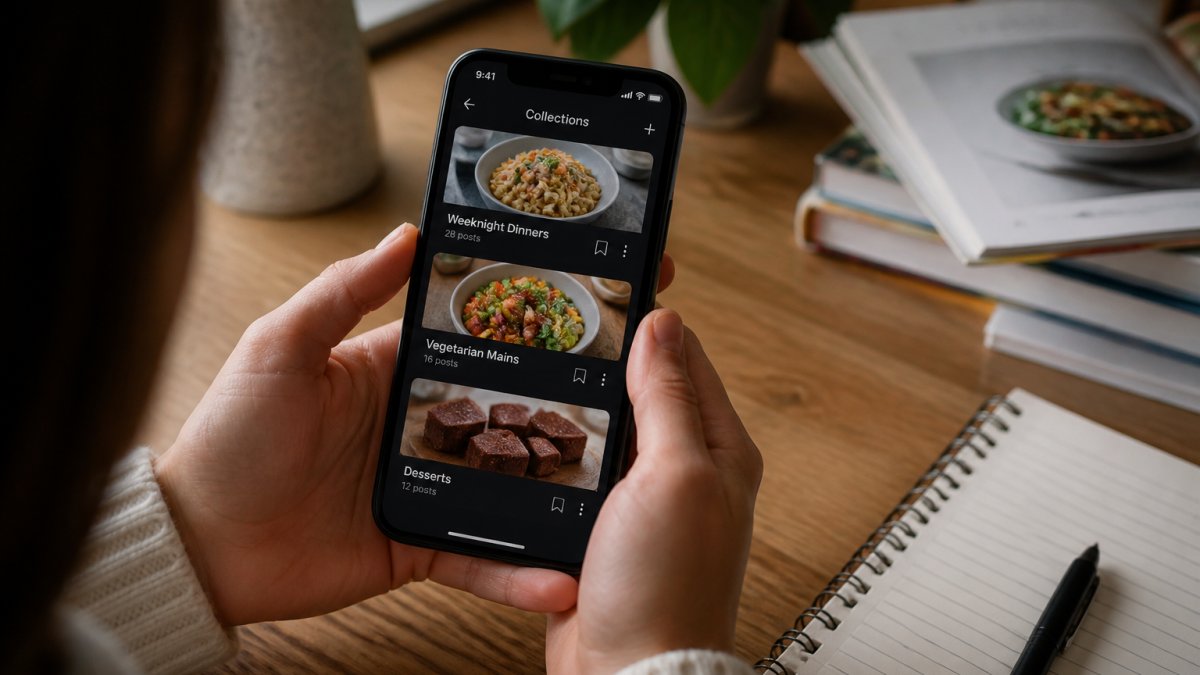
Instagram's Collections feature is the only built-in way to organize saved Instagram recipes, and it's free. Most guides mention it and move on. Here's the actual step-by-step, plus the naming and editing mechanics that make it usable months later.
Creating a Collection Step by Step
- Open Instagram and go to your profile.
- Tap the menu icon (three lines, top right on iOS; top right on Android).
- Tap Saved.
- Tap the + icon or Create Collection (wording varies slightly by app version).
- Type a name and tap Next or Done.
- Instagram may prompt you to add saved posts immediately. You can skip this and add them later.
To add a post to a collection after the fact: open the saved post, tap the bookmark icon again, and Instagram will show a list of your collections. Tap the one you want. A single post can live in multiple collections at once, which is the feature's biggest advantage over phone albums.
Naming Collections So You Actually Use Them
Vague names are the number one reason people abandon Collections. "Recipes" and "Food" tell you nothing when you're hungry at 6 p.m.
A useful collection name answers two questions: what is it, and when would I cook it? Compare:
- Weak: "Chicken"
- Strong: "Chicken, Under 30 Min"
- Weak: "Dinner"
- Strong: "Weeknight Dinners (No Oven)"
Aim for 5-10 collections maximum. Beyond that, you spend more time deciding where to file a post than you save by filing it. A common starting set:
- Weeknight Dinners
- Weekend Cooking
- Breakfast & Brunch
- Snacks & Desserts
- Meal Prep
- Tried & Loved
Editing, Reordering, and Deleting Collections
Collections are not locked once created. From the Saved screen:
- Rename: open the collection, tap the menu (three dots), choose Edit Collection or Rename.
- Reorder: press and hold a collection, then drag it. Put your most-used collections at the top.
- Delete: open the collection menu and choose Delete Collection. This removes the collection but does not unsave the posts, they stay in your main Saved list.
- Remove a single post: open the post inside the collection, tap the bookmark icon, and uncheck that collection.
Categorizing by Meal Type, Dietary Needs, and Difficulty
Pick one primary axis and stick with it. Mixing axes (a "Dinner" collection next to a "Vegetarian" collection next to a "Quick" collection) creates overlap and forces a decision every time you save something.
Choose the axis that matches how you actually pick dinner:
- By meal: Breakfast, Lunch, Dinner, Snacks, Desserts
- By diet: Vegetarian, Gluten-Free, High Protein, Low-Carb
- By time: Quick (under 20 min), Medium (20-45 min), Slow (45+ min)
- By occasion: Meal Prep, Date Night, Kid-Friendly, Entertaining
If you need a second axis, use Instagram's ability to save one post to multiple collections rather than creating a hybrid collection name. A 20-minute vegetarian pasta can sit in both "Weeknight Dinners" and "Vegetarian" without either collection becoming a catch-all.
Using a Recipe Keeper App for Instagram
Instagram's collections work, but they have limits. You can't search by ingredient. You can't convert saves directly to a grocery list. You can't access recipes offline.
Founders limited offer is open now →
This is where a recipe keeper app steps in. Apps like Linkplate capture the full recipe details from Instagram posts and reels, organize them in one place, and let you search by ingredient or dietary need.
Capturing Complete Recipe Details from Posts and Reels
The challenge with Instagram is incomplete information. A reel shows ingredients in a quick overlay. A carousel post might split the recipe across five slides. A caption might reference another post for the full method.
A recipe keeper app solves this by extracting all the details in one step. You paste the Instagram link. The app captures the photo, ingredients, instructions, and creator credit. Nothing gets lost in the process.
For reels especially, this matters. You get the video for reference, plus the extracted text so you can read while cooking. No more pausing and rewinding.
Building a Searchable Recipe Library
Once recipes are captured, you can organize them by ingredient, dietary tag, cuisine, or time. Search for "tomato" and get every recipe using tomatoes. Filter for "vegetarian" and "under 30 minutes" together. That's not possible in Instagram alone.
A searchable library also grows over time. After a few months, you'll have dozens of recipes organized and tagged. You'll rediscover recipes you forgot you saved. You'll spot patterns in what you actually cook versus what you bookmark.
The best recipe apps let you add notes too. These details make recipes more useful.
Converting Saved Recipes Into an Instagram Recipe Grocery List
Here's where organization pays off: converting recipes into a shopping list. Instead of writing ingredients by hand, the app pulls them from your saved recipes.
Select three recipes for the week. The app combines all ingredients, removes duplicates, and creates one list. Add quantities based on how many servings you need. The list is ready for shopping.
This saves time. It prevents forgotten ingredients. It reduces food waste because you're buying only what you'll use.
Maintaining Your Recipe Collection Over Time
A system only works if it survives contact with real life. Without upkeep, a saved-recipe collection turns back into a graveyard within a few months. The fix is a light, predictable routine, not a big annual cleanup.
A Realistic Review Cadence
Three tiers of maintenance cover almost every situation:
- Weekly (2 minutes): When you plan meals, open your collections and pick from them. If you skip a collection three weeks in a row, that's a signal it's misnamed or redundant.
- Monthly (10 minutes): Scroll the newest saves. Delete anything you saved on impulse and can't imagine cooking. Move anything you've actually cooked into a "Tried & Loved" collection.
- Seasonally (20 minutes, roughly every 3 months): Rename collections that have drifted, merge duplicates, and archive recipes tied to a season (heavy soups, holiday baking) so they don't crowd your everyday view.
Tagging and Filtering for Quick Access
Instagram Collections don't support tags, so tagging only works if you've moved recipes into a notes app, spreadsheet, or recipe keeper. The principle is the same everywhere: decide on a tag vocabulary once, then never improvise.
A workable convention uses three tag types:
- Ingredient tags for staples you cook with often:
chicken,garlic,lemon,rice. - Constraint tags for how you cook:
under-30,one-pan,no-oven,freezer-friendly. - Status tags for where a recipe is in your rotation:
untried,tried,repeat,retired.
Keep tags lowercase and hyphenated (under-30, not Under 30 or under30). Inconsistent casing and spacing are the most common reason filters stop working. If a recipe needs a tag you don't already use, ask whether it really needs a new one or whether an existing tag covers it.
Handling Recipes That Change or Disappear
Instagram posts get edited, deleted, or moved to a creator's paid product. A saved link is not a permanent copy. Two habits prevent lost recipes:
- Capture the essentials at save time. For any recipe you actually plan to cook, copy the ingredients, quantities, and steps into a note or recipe keeper within a day or two of saving. Include the creator's handle and the original post URL so you can credit them and find the source again.
- Do a link check during your seasonal review. Open a sample of older saves. If a post is gone, check whether the creator posted the same recipe elsewhere (their website, a newer reel, a pinned comment). If not, mark the recipe as
retiredrather than deleting it, so you don't re-save the same broken link later.
Deciding What to Keep
A collection of 200 recipes you never cook is less useful than 30 you actually make. During each monthly review, apply a simple rule: if you've scrolled past a recipe three times without cooking it, either cook it this week or delete it. The goal isn't a big library, it's a library you trust enough to open when you're hungry.
Frequently Asked Questions
What's the fastest way to organize saved Instagram recipes if I already have hundreds?
Start by creating broad categories (breakfast, lunch, dinner, desserts) in Instagram Collections, then sort recipes into these folders as you review them. Use a recipe keeper app to batch-import your saved posts and auto-tag them by ingredient or dietary type. Focus on organizing new recipes immediately as you save them rather than tackling the entire backlog at once. Most people find sorting 10-15 recipes per week more manageable than a single overwhelming cleanup session.
Can I save Instagram recipe reels and TikTok videos the same way as static posts?
Yes, Instagram's save feature works identically for reels and video content. However, video recipes present a challenge: the ingredients and instructions may be displayed quickly or scattered throughout the video. A dedicated recipe keeper app can help capture these details more reliably, then store them alongside the video link so you have a complete reference.
How do I create a grocery list from my saved Instagram recipes without manually typing everything?
Instagram's native tools don't generate grocery lists directly. A recipe keeper app designed for Instagram integration can extract ingredients from your saved recipes and compile them into a shopping list automatically. This feature eliminates the need to flip between recipes and a notes app, consolidating ingredients from multiple recipes and letting you check them off as you shop.
Is it worth moving my recipes from Instagram to a dedicated app, or should I just use Instagram Collections?
Instagram Collections are free and built-in, making them ideal for casual browsing. However, Collections lack search functionality and don't capture complete recipe details from reels or video posts. A dedicated recipe keeper app becomes valuable if you cook frequently, meal plan regularly, or need to generate grocery lists. Choose based on your cooking habits: casual savers benefit from Collections; frequent cooks benefit from a dedicated system.
What should I read next?
- How Do You Calculate Nutrition From Instagram Recipes? · 15 min read
- How to Search Recipes I Have Saved · 12 min read
- Best Way to Organize Bookmarks: A Practical 2026 Guide · 14 min read
- Create Grocery List From Recipes: A Complete 2026 Guide · 14 min read
Or browse every post.
Questions or ideas for a post? Get in touch →