
Is a Recipe App Worth It? A 2026 Guide

Table of Contents
- The Real Cost of Scattered Recipes
- Best Recipe Apps: What They Actually Do
- Free Recipe Organizer Options vs Paid Plans
- Paid Recipe App Features That Justify the Cost
- Recipe App vs Bookmarks: Which Approach Wins
- The Break-Even Test: When a Recipe App Pays for Itself
- Data Ownership and Long-Term Reliability
- Frequently Asked Questions
Last Updated: October 21, 2026
The Real Cost of Scattered Recipes
Saving recipes is easy. Organizing them is another story. Most home cooks have hundreds of recipes scattered across bookmarks, Pinterest boards, email drafts, and dog-eared cookbook pages. Finding the one you want at 6 PM on a weeknight feels impossible.
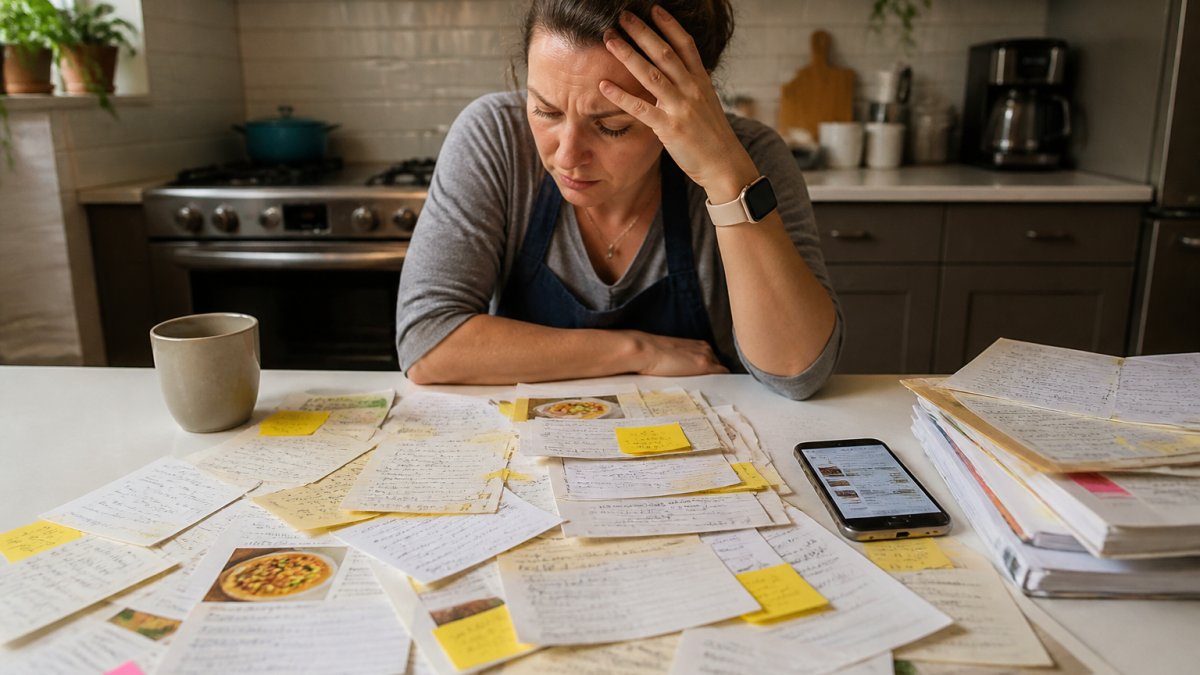
The problem isn't that recipes exist. It's that they're everywhere except where you need them. A TikTok video you saved three months ago. A blog post you bookmarked but can't find. A family recipe someone texted you. Without a central system, meal planning becomes a frustrating hunt instead of a smooth workflow.
Best Recipe Apps: What They Actually Do
A recipe app isn't just a storage locker. Modern recipe organizers capture recipes from the web, clean up the formatting, extract ingredients automatically, and connect that data to meal planning and shopping lists. The best ones work across YouTube, Instagram, food blogs, and recipe sites without requiring manual entry.
Linkplate handles the full workflow. You save a recipe from Instagram, YouTube, or a food blog. The app captures it, cleans the formatting (removing ads and clutter), and organizes it into your personal collection. Then you can convert saved recipes directly into a grocery list.
Other apps in this space offer similar storage capabilities, but they vary significantly in how they handle importing, organizing, and converting recipes into shopping lists. Some require manual entry. Others work with only certain platforms.
Free Recipe Organizer Options vs Paid Plans
The free versus paid decision hinges on one question: what's your actual cooking volume and organizational complexity?
A free recipe organizer makes sense if you save recipes occasionally, cook the same meals regularly, or don't mind manual entry. Many free options let you bookmark recipes and create basic collections.
Paid recipe apps justify their cost when you're juggling multiple dietary requirements, saving recipes frequently from social media, or meal planning for more than two people.
The break-even point varies by household. A single person cooking three meals a week from bookmarks? Free is probably fine. A parent managing school lunches, work dinners, and weekend meal prep across multiple dietary restrictions? A paid app saves real time every week.
Paid Recipe App Features That Justify the Cost
Not every paid feature matters to every cook. The ones that actually move the needle are automation, organization, and integration.
Automatic ingredient extraction saves the most time.
Smart search and filtering becomes critical when your recipe collection grows. Search by ingredient, dietary preference, cooking time, or cuisine.
Cross-device syncing means your recipes follow you. Save on your phone while scrolling social media. Access them on your tablet while cooking.
Grocery list generation is where a recipe app stops being storage and starts being a workflow tool. Select the recipes you're cooking this week.
Linkplate captures from YouTube, Instagram, and food blogs. It cleans recipes automatically. It converts your saved recipes into a shopping list without manual work.
Recipe App vs Bookmarks: Which Approach Wins
Bookmarks are free. They're simple. They're already built into every browser. So why consider a recipe app at all?
Bookmarks fail at scale. After saving fifty recipes, finding the one you want becomes a folder-diving exercise. Bookmarks don't extract ingredients, don't sync across devices, and don't connect to meal planning.
A recipe app is a system. It organizes automatically. It makes recipes searchable by ingredient or dietary preference. It converts collections into shopping lists. It works across devices.
The honest tradeoff: bookmarks cost nothing and require no learning curve. A recipe app costs time to set up and money to use, but delivers a complete workflow instead of just storage.
For casual cooks saving a few recipes monthly, bookmarks work fine. For anyone saving recipes weekly or managing dietary requirements, a recipe app wins.
The Break-Even Test: When a Recipe App Pays for Itself
Most reviews answer "is a recipe app worth it" with a feature list. That's the wrong unit of analysis. The right question is whether the app returns more value than it costs, in time, money, and meals actually cooked. Here's a practical framework you can run in about ten minutes.
Step 1: Measure your current friction
For one normal week, note three numbers:
Founders limited offer is open now →
- Search time: minutes spent hunting for a recipe you already saved (bookmarks, screenshots, texts, cookbooks).
- List-building time: minutes spent transcribing ingredients into a grocery list, plus any duplicate trips because something was missed.
- Skipped meals: nights you ordered takeout or defaulted to a backup meal because finding a recipe felt harder than not cooking.
Most home cooks underestimate search time because it's spread across the week. A common pattern is 5-10 minutes per meal attempt, several times a week, plus one extra grocery run per month for forgotten items.
Step 2: Estimate what the app actually removes
A recipe app doesn't eliminate all of that friction, it compresses the repetitive parts. Be honest about which tasks it automates for you:
- Capture and cleanup: saving from a blog, Instagram, or YouTube without retyping ingredients.
- Search and filter: finding a saved recipe by ingredient, cuisine, or cook time instead of scrolling.
- List generation: converting selected recipes into a consolidated shopping list.
If your current workflow already handles one of these well (for example, you keep a tidy spreadsheet), don't credit the app for fixing it. Only count the friction it genuinely removes.
Step 3: Run the break-even math
The formula is simple: weekly time saved × weeks until you've recovered setup time = break-even point.
- If setup takes about two hours and the app saves 30 minutes a week, you break even in roughly four weeks and are ahead every week after.
- If it saves 10 minutes a week, break-even stretches to about twelve weeks, still positive, but a much weaker case if you're paying monthly.
- If it saves nothing measurable in week one, the app isn't the problem; your workflow is. Fix the workflow first.
Step 4: Segment by household
The math lands differently depending on who's cooking:
- Solo cook, 2-3 meals a week, simple preferences: free tools or bookmarks are usually enough. The time saved rarely clears the setup cost.
- Couple or small family, 4-5 dinners a week, some dietary needs: a paid app typically pays back within a month because search and list-building are daily friction points.
- Family with multiple dietary restrictions, school lunches, and weekend prep: the highest-return case. Duplicate grocery purchases and skipped meals are the biggest hidden costs, and both shrink when recipes and lists live in one place.
- Frequent social-media saver (TikTok, Instagram, YouTube): automation-heavy apps win because manual entry is the dominant cost.
Step 5: Count the money, not just the minutes
Time is the easy metric. The financial case is quieter but real:
- Fewer duplicate purchases: when your list is generated from recipes, you stop buying a second jar of something already in the pantry.
- Less food waste: meal planning around what you already have reduces the "bought it, forgot it, tossed it" cycle.
- More meals cooked at home: each skipped takeout night replaced by a planned meal is the largest single line item in the math.
You don't need precise figures to make the decision, you need direction. If two of those three move in your favor, the app is paying for itself even before you count the minutes.
The break-even test isn't about the subscription price. It's about whether the app removes enough weekly friction to recover its setup cost, and whether the household profile matches the cases where that actually happens.
Don't credit an app for solving friction you don't have. If your spreadsheet already handles search and lists, a paid app has to beat that baseline, not the chaos you left behind years ago.
Data Ownership and Long-Term Reliability
Most recipe app reviews skip this section entirely. That's a mistake, because the answer to "is a recipe app worth it" depends partly on whether your collection survives the app. A recipe library is an asset you build over years; if it can vanish with a company, the value proposition changes.
What "ownership" actually means
With bookmarks, spreadsheets, and paper, you own the data by default. With a hosted recipe app, your recipes live on the company's servers under your account. Ownership is defined by three practical questions:
- Can you export? Look for a bulk export to a standard format (CSV, JSON, or PDF). A per-recipe copy button is not the same as a full-library export.
- Can you access offline? If the app requires a live connection to read a recipe you saved, your access depends on the service staying up.
- What happens on shutdown or acquisition? Check the terms of service for a data-retention or export window. Many apps promise a notice period; few guarantee a portable format.
The migration test
Before committing, run a small migration drill:
- Export five recipes from your current system (bookmarks, notes, screenshots).
- Import them into the candidate app.
- Export those same five recipes back out.
- Confirm the ingredients, quantities, and steps survived the round trip.
If the round trip loses structure, ingredients merged into a paragraph, quantities dropped, the app is a storage locker, not a portable cookbook. That matters if you ever switch apps or want a backup.
Account and platform dependencies
A few reliability factors are easy to overlook:
- Account requirement: some apps require sign-in even for recipes you saved yourself. That's fine until you're offline or logged out.
- Cross-platform transfer: confirm the app works on the devices you actually cook with (phone in the kitchen, tablet on the counter, laptop for planning).
- Backup habit: even with export, keep a periodic backup of your library. Treat the app as the working copy, not the only copy.
A practical rule
A recipe app is worth paying for when you can get your data out as easily as you put it in. If export is one click and the format is standard, the risk is low and the app is a reasonable home for your collection. If export is buried, partial, or missing, you're renting access rather than building a library, and that should factor into whether the price is justified.
Ask one question before subscribing: "If this app closed tomorrow, how would I get my recipes out?" If the answer isn't obvious from the settings menu, treat that as a real cost.
Long-term reliability isn't a paranoid concern, it's part of the value calculation. An app you can export from is a tool you own; an app you can't is a subscription you depend on.
Frequently Asked Questions
Are recipe apps worth paying for compared to free options?
It depends on your cooking frequency and household size. Free recipe organizers work for occasional cooks, but paid recipe apps typically offer grocery list generation, cross-device syncing, and recipe scaling, features that save time for families cooking 4+ nights per week. If you spend 30+ minutes monthly searching for saved recipes or manually retyping ingredients into shopping lists, a paid app likely saves enough time to justify the subscription cost.
Is a recipe app better than using Pinterest or bookmarks?
Recipe app vs bookmarks comes down to workflow. Bookmarks are free but scattered across platforms, making recipes hard to find when you need them. A dedicated recipe app centralizes everything, enables ingredient-based searching, and converts recipes directly into grocery lists. For people saving recipes from YouTube, Instagram, and food blogs, this consolidation eliminates the clutter and speeds up meal planning by hours each month.
Can recipe apps actually capture recipes from Instagram Reels and TikTok videos?
Most recipe apps can save links from video platforms and extract ingredient information, though reliability varies depending on how the video is formatted. Apps that clean and organize recipes automatically tend to work better than manual entry, reducing the friction of capturing recipes from social media. However, some video-only content may require manual note-taking if the app can't extract structured data.
What happens to my recipes if a recipe app company shuts down?
This is a legitimate concern. Before committing to any paid recipe app, verify that it offers data export (usually as PDF or CSV format) so you can migrate your collection if needed. Privacy and data ownership matter, choose apps that clearly state they won't sell your data and that allow you to download your full recipe library. This protects your investment and gives you control over your personal cookbook.
What should I read next?
- Which YouTube Cooking Channels Are Best for Beginners? · 9 min read
- How Do You Calculate Nutrition From Instagram Recipes? · 15 min read
- How to Search Recipes I Have Saved · 12 min read
- 7 Best Apps for Grocery Planning and Smart Shopping · 14 min read
Or browse every post.
Questions or ideas for a post? Get in touch →